
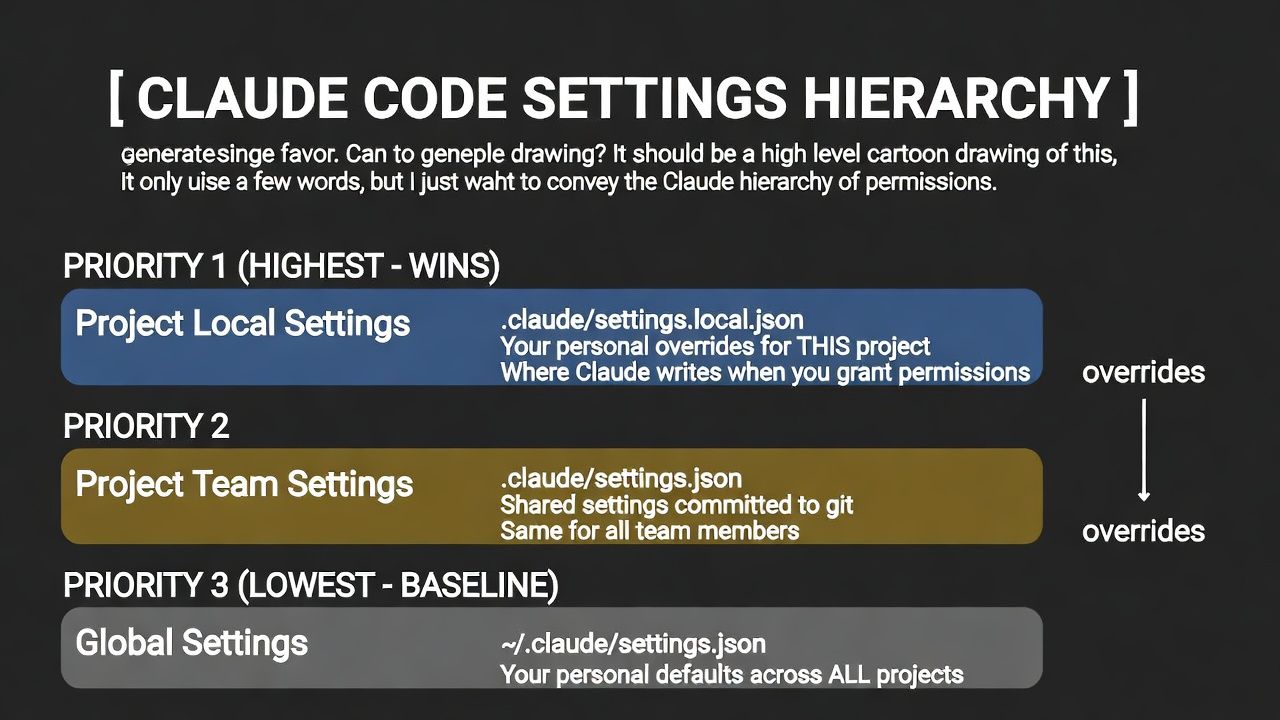
If you want to have Claude not stop you every three seconds, asking you a million questions if you want to do this or that, this is how you set up your permissions. That you understand what the hierarchy is, and that your local always wins. This is the key one.
  ┌─────────────────────────────────────────────────────────────────┐
  │                  CLAUDE CODE SETTINGS HIERARCHY                 │
  ├─────────────────────────────────────────────────────────────────┤
  │                                                                 │
  │   PRIORITY 1 (HIGHEST - WINS)                                   │
  │   ┌─────────────────────────────────────────────────────────┐   │
  │   │  Project Local Settings                                 │   │
  │   │  .claude/settings.local.json                            │   │
  │   │  Your personal overrides for THIS project               │   │
  │   │  ⚡ Where Claude writes when you grant permissions       │   │
  │   └─────────────────────────────────────────────────────────┘   │
  │                            ▲                                    │
  │                            │ overrides                          │
  │                            │                                    │
  │   PRIORITY 2                                                    │
  │   ┌─────────────────────────────────────────────────────────┐   │
  │   │  Project Team Settings                                  │   │
  │   │  .claude/settings.json                                  │   │
  │   │  Shared settings committed to git                       │   │
  │   │  Same for all team members                              │   │
  │   └─────────────────────────────────────────────────────────┘   │
  │                            ▲                                    │
  │                            │ overrides                          │
  │                            │                                    │
  │   PRIORITY 3 (LOWEST - BASELINE)                                │
  │   ┌─────────────────────────────────────────────────────────┐   │
  │   │  Global Settings                                        │   │
  │   │  ~/.claude/settings.json                                │   │
  │   │  Your personal defaults across ALL projects             │   │
  │   └─────────────────────────────────────────────────────────┘   │
  │                                                                 │
  └─────────────────────────────────────────────────────────────────┘
Now, the next thing you have to understand is how you want to run your code. If you're a senior developer, you're probably going to run on bypass permissions so you don't have to keep on clicking all the edit buttons or the approve buttons.
  ┌─────────────────────────────────────────────────────────────────┐
  │                   CLAUDE CODE PERMISSION MODES                  │
  ├───────────────────┬─────────────────────────────────────────────┤
  │       Mode        │              When to use it                 │
  ├───────────────────┼─────────────────────────────────────────────┤
  │ default           │ You're new to Claude Code or working in an  │
  │                   │ unfamiliar/sensitive codebase - want to     │
  │                   │ approve everything before it happens.       │
  ├───────────────────┼─────────────────────────────────────────────┤
  │ acceptEdits       │ You trust Claude to edit files but want to  │
  │                   │ review shell commands - good middle ground  │
  │                   │ for normal development work.                │
  ├───────────────────┼─────────────────────────────────────────────┤
  │ dontAsk           │ You're a senior dev who knows what you're   │
  │                   │ doing - let Claude work autonomously but    │
  │                   │ keep minimal guardrails for destructive     │
  │                   │ operations.                                 │
  ├───────────────────┼─────────────────────────────────────────────┤
  │ bypassPermissions │ Full send. You completely trust Claude in   │
  │                   │ this project. Best for agentic workflows,   │
  │                   │ sprints, and when you're tired of clicking. │
  ├───────────────────┼─────────────────────────────────────────────┤
  │ plan              │ You want Claude to research and plan only - │
  │                   │ no code changes. Good for exploring a       │
  │                   │ codebase or getting recommendations.        │
  ├───────────────────┼─────────────────────────────────────────────┤
  │ delegate          │ Used internally when Claude spawns sub-     │
  │                   │ agents. You won't set this yourself.        │
  └───────────────────┴─────────────────────────────────────────────┘
Use this file for your settings.local.json
  {
    "permissions": {
      "defaultMode": "dontAsk"
    }
  }
Now, the problem with this is it uses the Don't Ask methodology. If you have tools that you have not turned on or don't have permission to use automatically, it will just fail silently. It will show you that it failed, but it won't ask you for anything. It will fail.
Tools
tools are important to understand because they are the gateway for the set of permissions that you want to run. Tools are capabilities that allow Claude to take actions on your computer—like reading files, running commands, or searching the web—rather than just generating text responses. Each tool is a specific permission you grant, giving Claude the "hands" it needs to actually do work instead of just talking about it.
Claude Code Tools
  - Read - Reads the contents of a file from your filesystem.
  - Write - Creates a new file or overwrites an existing file with new content.
  - Edit - Makes targeted changes to specific parts of an existing file.
  - Bash - Executes any shell command in your terminal.
  - Glob - Finds files matching a pattern (like *.js or src/**/*.ts).
  - Grep - Searches for text or patterns inside file contents.
  - WebFetch - Retrieves and processes content from a URL.
  - WebSearch - Searches the web for current information.
  - Task - Launches a specialized sub-agent to handle complex work autonomously.
  - TaskOutput - Retrieves results from a background task or agent.
  - KillShell - Terminates a running background shell process.
  - TodoWrite - Creates and manages a task list to track progress.
  - NotebookEdit - Edits cells in Jupyter notebooks.
  - AskUserQuestion - Asks you clarifying questions with selectable options.
  - Skill - Invokes a predefined workflow or slash command.
  - EnterPlanMode - Switches to planning mode for designing an approach before implementing.
  - ExitPlanMode - Exits planning mode after the plan is ready for approval.
now that you know what those tools are, most of those you just want to turn on automatically so you don't have to get approval
Here's the new full permissive settings.json:
  {
    "env": {
      "CLAUDE_CODE_DISABLE_NONESSENTIAL_TRAFFIC": "1",
      "CLAUDE_CODE_EXPERIMENTAL_AGENT_TEAMS": "1"
    },

    "permissions": {
      "defaultMode": "dontAsk",
      "allow": [
        "Read",
        "Write",
        "Edit",
        "Bash",
        "Glob",
        "Grep",
        "WebFetch",
        "WebSearch",
        "Task",
        "TaskOutput",
        "KillShell",
        "TodoWrite",
        "NotebookEdit",
        "AskUserQuestion",
        "Skill",
        "mcp__atlassian"
      ]
    },
    "enabledPlugins": {
      "swift-lsp@claude-plugins-official": true
    }

  }
Now what about guard rails? One thing I don't like to do is make sure I don't delete everything crazily. my biggest two nightmares are this "rm -rf" and terraform wiping out my entire AWS account. terraform is by far the scariest of the options
Claude actually has baked-in guard rails that are hidden to the user and that's part of the training model. It understands: hey, if it's an RM minus RF, you should probably ask for permission or don't force a GitHub push. It will ask the user to actually force it. so it's basically preventing the user from totally messing something up. bad stuff can happen if the user is blindly pressing yes, yes, yes, which is why permissive mode is so good because it approves everything and only flags the critical issues that you really need to focus on
So the architecture is:
  ┌───────────────────────┬───────────────────────────────────────┬─────────────────────┐
  │         Layer         │           What it controls            │    Configurable?    │
  ├───────────────────────┼───────────────────────────────────────┼─────────────────────┤
  │ Tool Permissions      │ Can Claude use Edit, Bash, etc.?      │ Yes (settings.json) │
  ├───────────────────────┼───────────────────────────────────────┼─────────────────────┤
  │ Behavioral Guardrails │ Will Claude rm -rf, force push, etc.? │ No (hardcoded)      │
  └───────────────────────┴───────────────────────────────────────┴─────────────────────┘
Enjoyed this? Explore more on aiclaude or get in touch.